
Axiona: the vendor-independent robot management system
A standardized core connects robots, building systems, and third-party systems. Every new integration immediately benefits all industry solutions, so your integration effort drops with each connection.
1 to 3 days
to connect a new robot type
about 1 week
to connect a new elevator controller
Three operating modes
Cloud, on-premise, or fully offline
Cloud
On-premise
Fully offline
Architecture
How Axiona fits together
Axiona sits between your robots and the outside world. Tasks run through the same layers from trigger to execution, no matter which manufacturer built the robot, and each offering uses the parts it needs. It is the basis for hospOS, shoppiOS and partner solutions.
The robotics landscape around Axiona: Choose your role, or Axiona itself, to zoom in.
Operators
Axiona runs robots from different manufacturers as one fleet and connects them with elevators and doors. There are dedicated industry solutions for hospitals and retail.
We set up the connection with you in a joint project.
Full picture
All layers and building blocks of Axiona. Integrators also build their own solutions on them, through the REST API or with their own software directly on the robot (Android wrapper, JavaScript bridge). Axiona can be used in places without a dedicated industry solution as well, such as hotels or airports. Choose an offering to highlight the parts it uses.
hospOS
Industry solution for hospitalsFor hospitals that hand transport tasks to robots, such as lab samples, medication and supplies, and have robots show visitors the way at reception. hospOS includes the app, planning and the Core, up to the connection of elevator, door and robot. Tasks come from a click in the app or from a call button in the room.
shoppiOS
Industry solution for retailFor retailers whose customers ask the robot for a product by voice or touch and are guided to the right department. shoppiOS includes the app, the connection to product data from your PIM or item master, planning and the Core. Trips can also be started with a call button.
Elevators and doors for your fleet
For robot and fleet providersFor providers with their own fleet manager. Axiona calls elevators and opens doors for your robots' trips across manufacturers, based on where the robot and the door are in the building model. Your fleet manager, your app and your task logic stay with you; we set up the connection with you in a joint project. At the elevator, Axiona only uses the standard operating interface and does not intervene in the elevator's control or safety systems.
Axiona for your platform
For elevator manufacturers and software providersFor manufacturers of elevator and building technology and for providers of software such as building platforms, hospital information systems or CRM that want to offer their customers a robot connection. Your platform sends tasks to robots from different manufacturers through the REST API and queries their status; Axiona plans the tasks, calls elevators and opens doors. We set up the connection of your platform in a joint project.
Fleet management
For mixed fleetsFor operators who want to run robots from different manufacturers as one fleet and have no fleet management of their own. The fleet manager assigns tasks and plans trips with several stops; the Core handles elevator and door. Tasks come from an app or from third-party systems through the REST API.
AI Harness
Tasks in natural language, spoken or written In developmentFor operators who want to give robots and devices tasks in natural language, spoken or written, in the future. The AI Harness turns the request into a task for planning; from there it runs like any other task. Language models run on-premise or in the cloud.
A new robot, elevator or door integration is available to every offering.
At the elevator, Axiona only uses the standard operating interface: calling a floor and holding the door open. Axiona does not intervene in the elevator's control or safety systems.
Graphic as text
Triggers: Apps such as hospOS and shoppiOS, used by click in the app or by touch and voice at the robot; call buttons for robot tasks in the room; third-party systems such as building platforms or specialist software. All of them use the REST API.
Access: Tasks come in through the REST API from apps, call buttons and third-party systems. Predefined tasks, such as a click or a call button, go from there straight to planning, without the AI Harness.
Understand: The AI Harness turns natural language, spoken or written, into a task (in development).
Plan: The fleet manager assigns tasks to robots from different manufacturers and plans trips. If you have your own fleet manager, you keep it and use elevators and doors through the Core; we set up the connection in a joint project.
Control: The Axiona Core calls elevators and opens doors for trips between floors, based on where the robot and the door are in the building model. The building model with floors, locations, doors and elevators is the same for every connected robot; it is maintained during commissioning, and the Core uses it at runtime, including offline. At the elevator, Axiona only uses the standard operating interface: calling a floor and holding the door open. Axiona does not intervene in the elevator's control or safety systems.
Device adapters per manufacturer connect the Core with elevators and doors, robots and AI models (AI models in development). The next section shows which robots, elevator controls and doors are connected.
Data adapters bring data from your systems to the apps, such as product data from PIM or item master.
Permissions and logging: Each user's permissions are defined. Actions are logged.
Runtime: On-premise in your building or in the cloud at Athegus. On-premise, tasks keep running without an outside connection, as long as they run through Axiona in your building and not through a cloud or a manufacturer's API.
- The offering hospOS uses the hospOS app and call buttons as triggers, the REST API, plan, control with the building model, and device adapters for elevators, doors and robots.
- The offering shoppiOS uses the shoppiOS app and call buttons as triggers, the REST API, data adapters, plan, control with the building model, and device adapters for robots.
- The offering “Elevators and doors for your fleet” uses your fleet manager, control with the building model, and device adapters for elevators and doors.
- The offering “Axiona for your platform” uses your platform as a third-party system, the REST API, plan, control with the building model, and device adapters for elevators, doors and robots.
- The offering “Fleet management” uses apps and third-party systems as triggers, the REST API, plan, control with the building model, and device adapters for elevators, doors and robots.
- The offering “AI Harness” (in development) uses apps as the trigger, the REST API, understand, plan, control with the building model, and device adapters for elevators, doors, robots and AI models.
- Permissions and logging and the runtime apply to every offering.
Integrations
Robots, elevators, doors and third-party systems
| Category | System | Status |
|---|---|---|
| Robots | Keenon, AutoXing, OrionStar, temi | connected |
| Robots | other robot types | on request |
| Elevators | KONE, Schindler, NewLift, Reimann | connected |
| Elevators | other elevator controllers | on request |
| Doors and building systems | Relay connection | connected |
| IT systems | REST API, product data from PIM or item master data | connected |
| IT systems | ERP, merchandise management, POS system, analytics tools | on request |
| IT systems | Workflow and ticketing systems | on request |








Statistics, reporting and analytics
Make operations visible: dashboards and scheduled reports
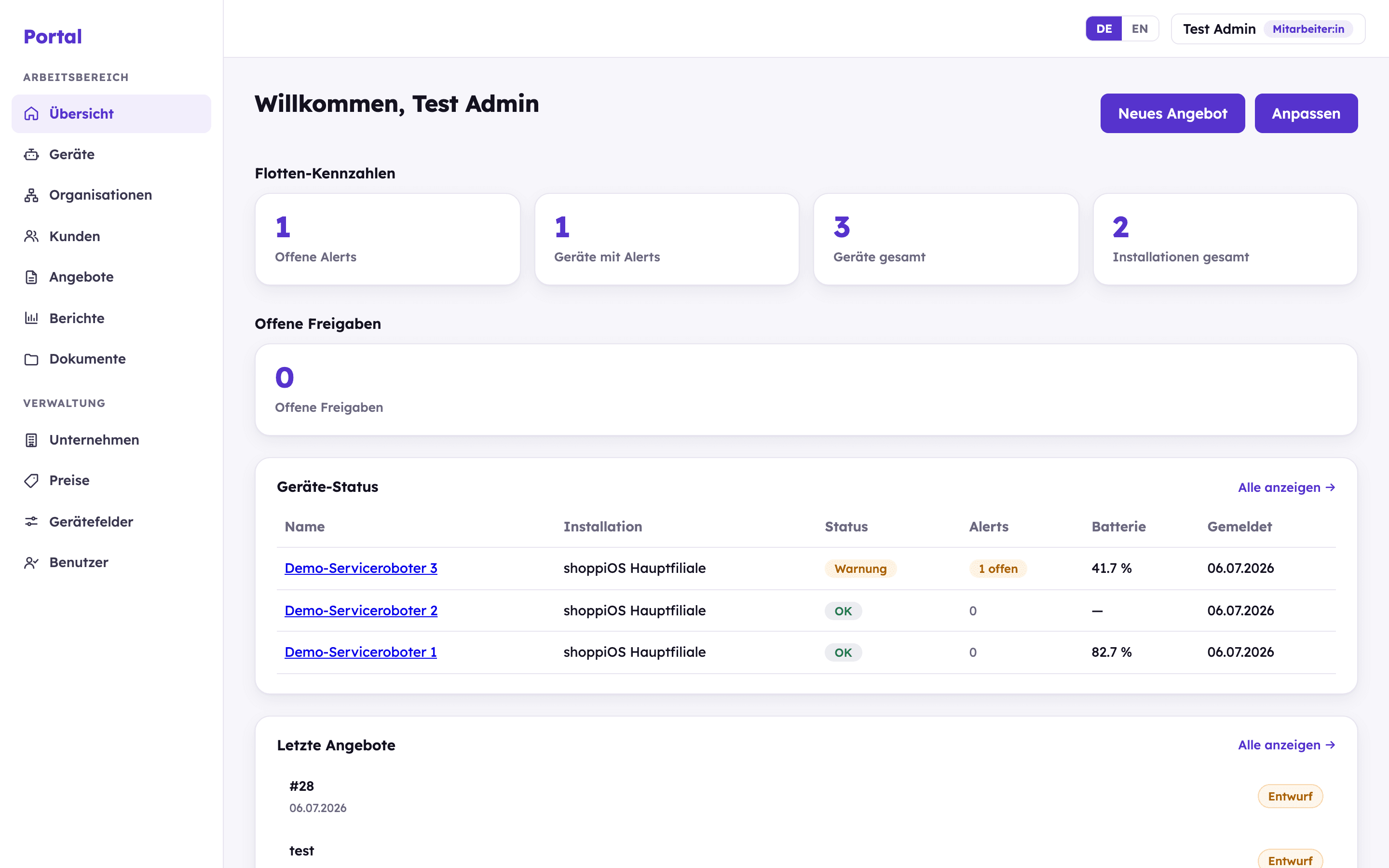
The portal brings together live status, usage statistics per installation and robot, and scheduled PDF reports. Missing values are shown as a data gap, not as zero.
Fleet dashboard
Fleet status, open alerts and key figures at a glance, configurable per user role.
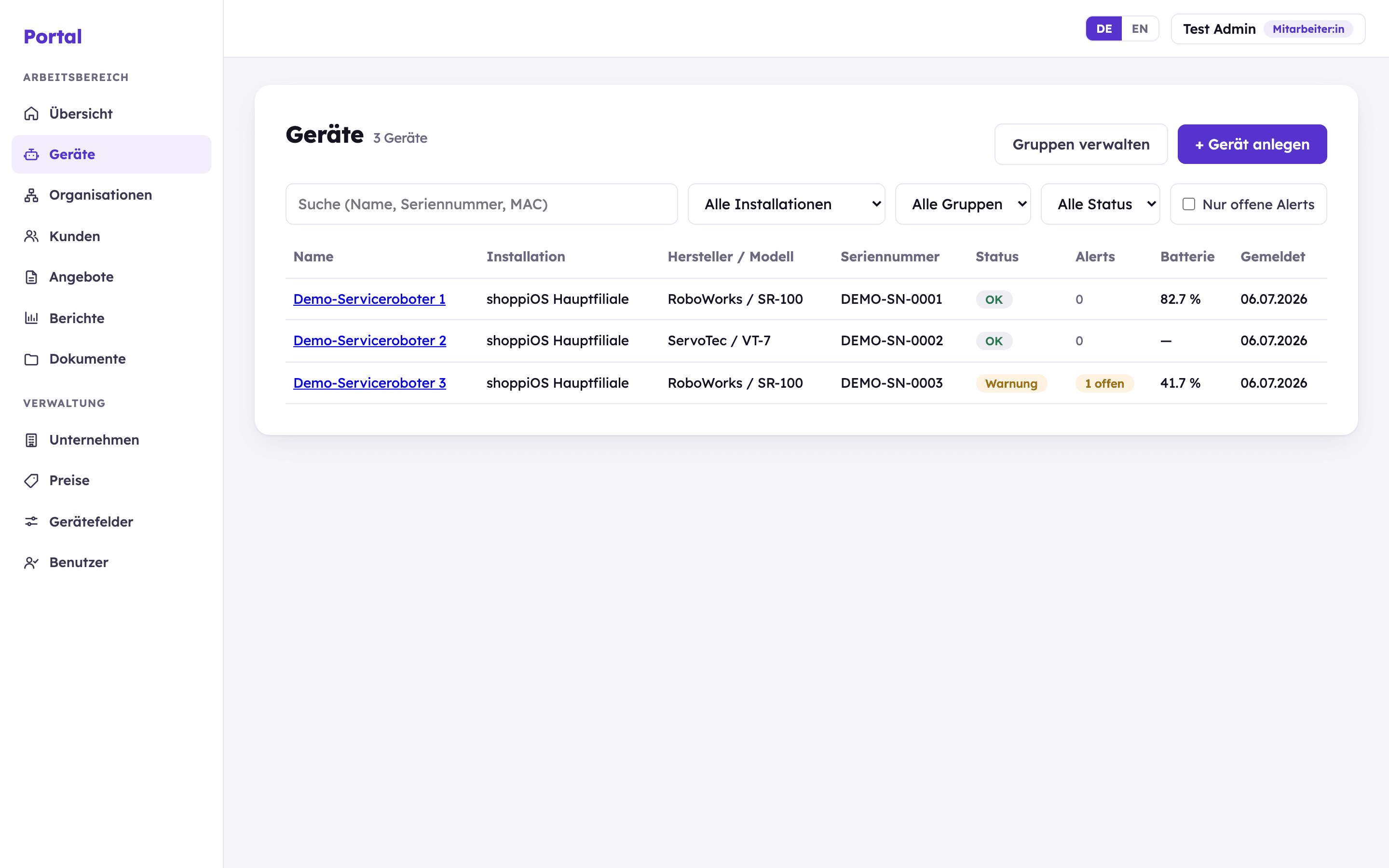
Device management
Every robot with live status, battery and alerts, vendor-agnostic in one list.
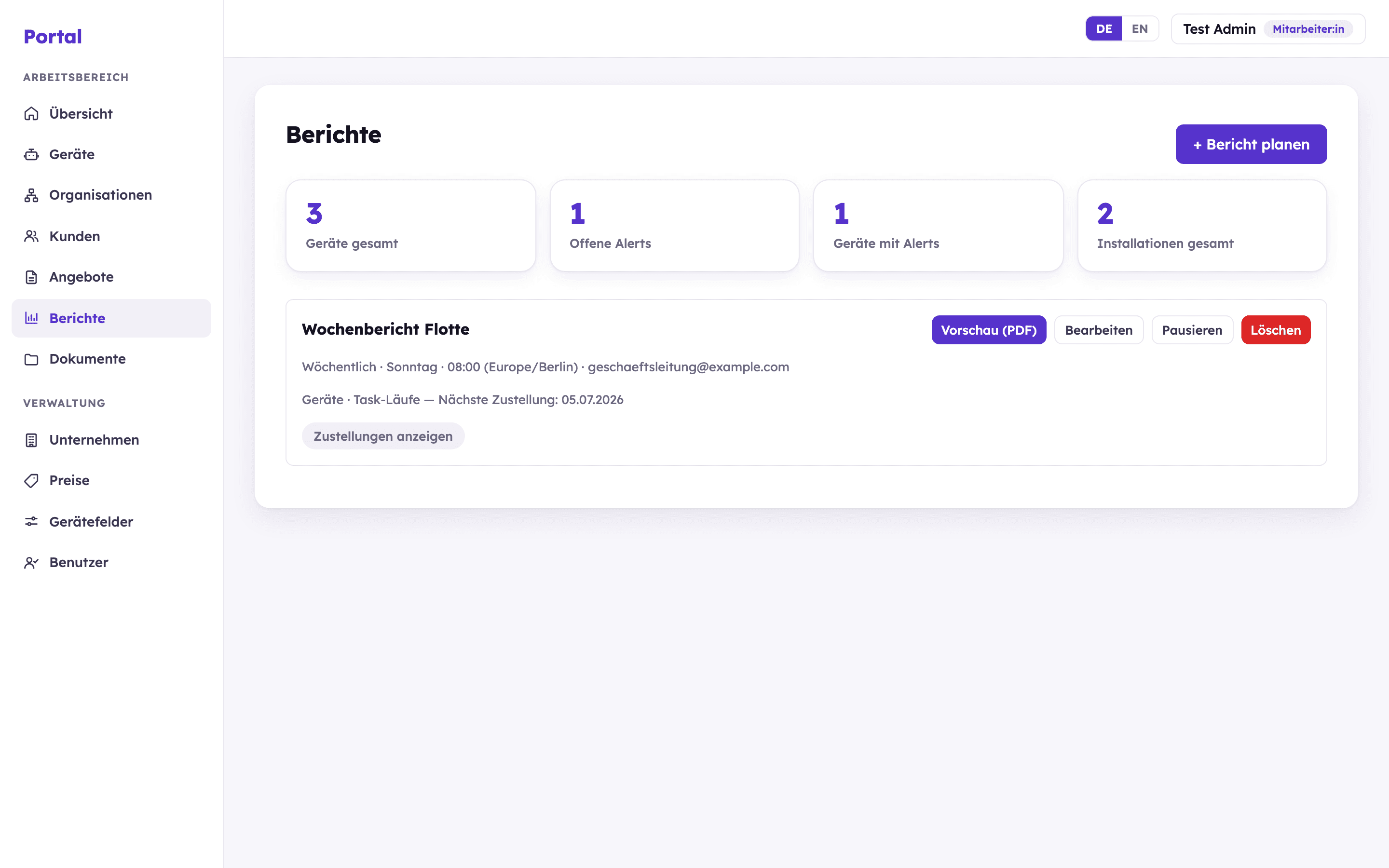
Scheduled reports
Recurring PDF reports delivered automatically by email, with schedule and recipients.
Read on
Headless and sovereignty
Headless for partners
Partners build their own solutions via REST API, an Android wrapper around a WebView and a JavaScript bridge to the robot.
To the partner platformSovereignty and security
Neutral, on-premise, offline, from GDPR to KRITIS. Encapsulated operation keeps the data in the building and reduces the documentation burden.
To sovereigntyReady for a technical overview?
We show Axiona in action and answer your architecture questions.